Data Flow Diagram Generator: From Description to DFD

Explain what your system does, who uses it and what it stores. The AI draws numbered processes, external entities, data stores and labelled data flows as a Draw.io file you can edit.

0/2000

Try an example

Free preview, no account needed. Pay $1.99 only to unlock the editable file.

See How Information Moves Through a System

A data flow diagram shows where data comes from, which processes change it, where it is stored and where it goes. Drawing the circles, stores and labelled arrows by hand is slow and easy to get wrong. This data flow diagram generator does the first draft in standard notation.

Standard DFD Symbols

Processes are numbered circles, external entities are rectangles and data stores are open-ended boxes, as in the Yourdon–DeMarco style.

Context and Level 1

Ask for a context diagram with one process for the whole system, or a level 1 DFD that breaks it into numbered processes.

Editable in Draw.io

Every shape and flow is a real Draw.io object, so renaming a process or adding a data store takes seconds.

Data Flow Diagrams Made From One Paragraph

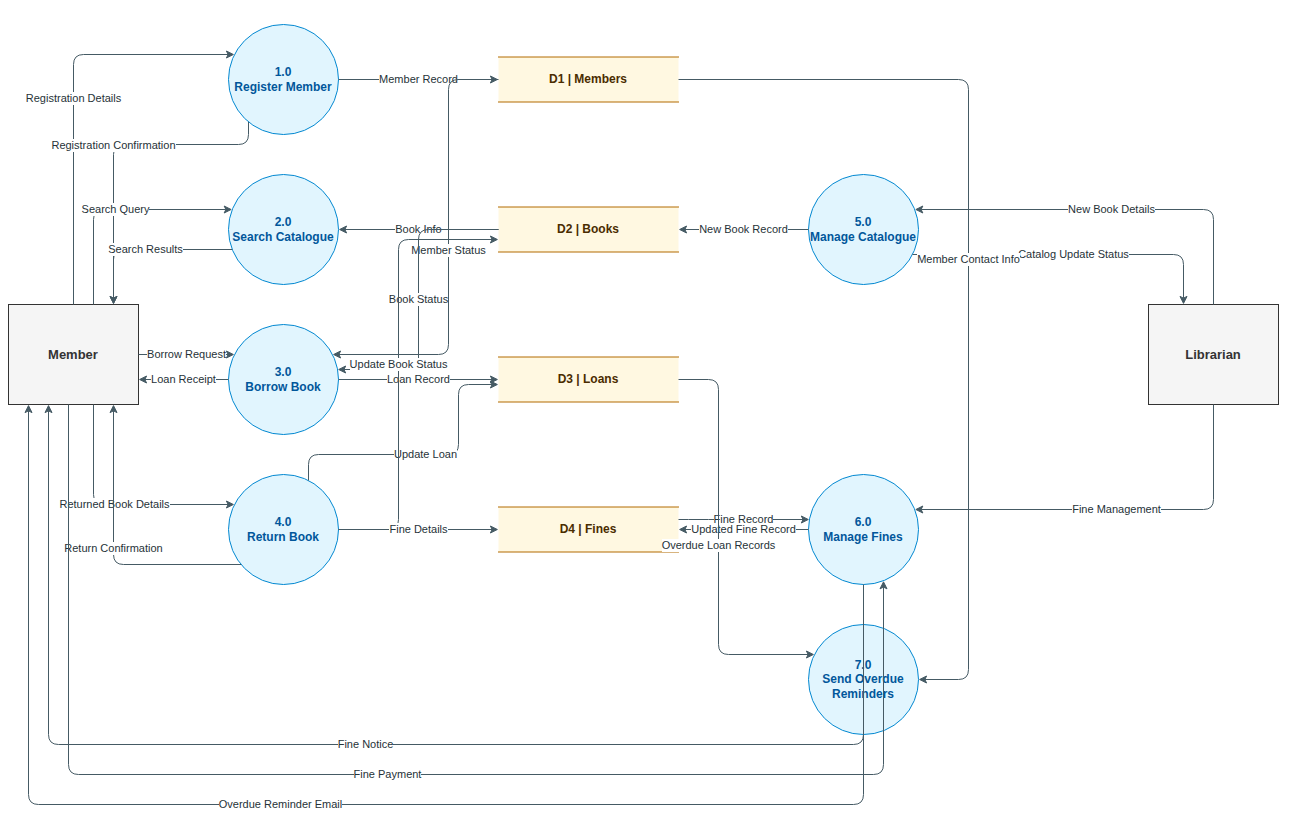
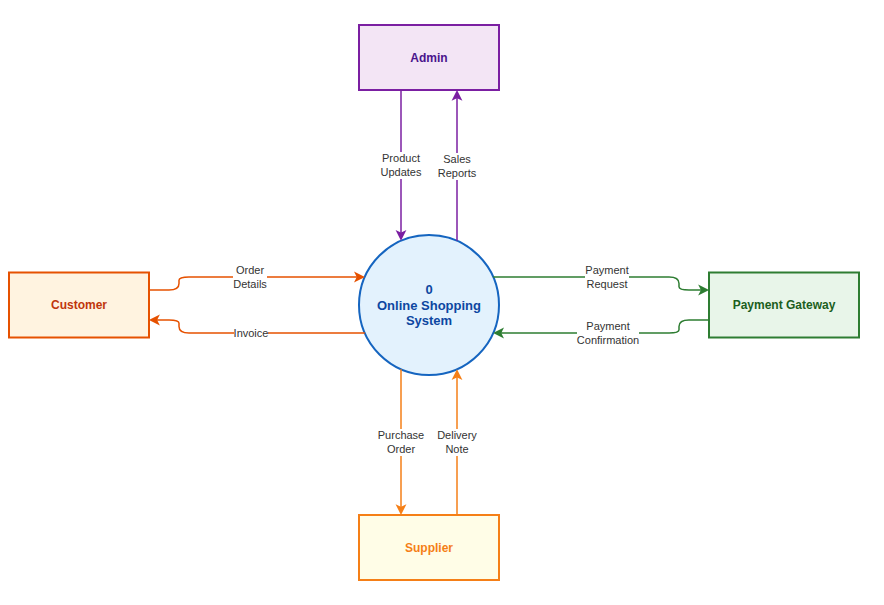
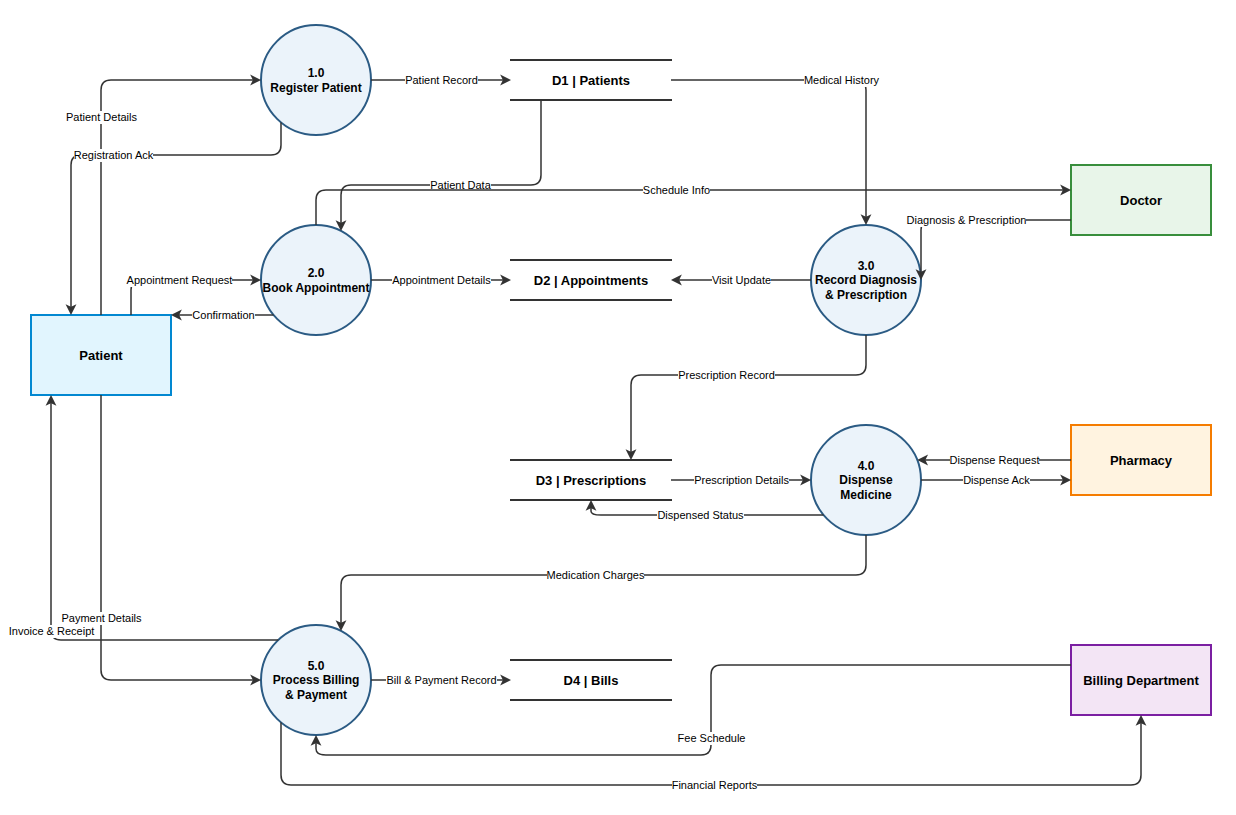
The data flow diagram generator drew each example below from one of the descriptions in the example list.

Three Steps

How to Make a Data Flow Diagram From Text

The data flow diagram generator turns a short description into a finished DFD in a couple of minutes.

1

Describe the System

Write who uses the system, what it does and what it stores, or start from one of the examples above the button.

2

Review the Free Preview

The AI draws processes, entities, stores and flows and shows a watermarked preview so you can check the rules.

3

Unlock and Edit

Unlock the editable Draw.io file, refine it in the online editor or with AI edits, and download it.

Guide

Getting a Correct DFD on the First Try

What each level shows, how to describe your system, and the mistakes examiners look for.

Context diagram, level 0 and level 1

A context diagram, often called a level 0 DFD, shows the whole system as a single process surrounded by the external entities it exchanges data with. It sets the scope: everything inside the circle is the system, and everything outside it is not.

A level 1 DFD opens that circle. It splits the system into its main processes, numbered 1.0, 2.0 and so on, and adds the data stores they share. Ask the data flow diagram generator for "a context diagram" or "level 0" to get the first kind; otherwise you get level 1.

How to describe your system

List who or what is outside the system and what each one sends in or gets back: "customers send orders and receive invoices", "the bank receives payment files". Then list what the system does with that data, using verbs, and what it needs to remember, using plural nouns such as orders or members.

You do not need to know DFD notation. Write in ordinary sentences and the rules are applied for you: processes get numbers and verb phrases, stores get ids such as D1, and every flow is named after the data it carries.

Mistakes to check for

Examiners look for the same few errors. A process with only inputs is a black hole; one with only outputs is a miracle. A data store connected straight to an external entity, or two entities connected to each other, breaks the rules. Flows labelled with verbs instead of data are another common deduction.

Scan the preview for these before unlocking. If you find one, fix it in the Draw.io editor or ask the AI, for example "connect the fines store through process 6 instead of directly to the member".

DFDs and other diagrams

A DFD shows how information moves, not the order of steps or the structure of the data. For the steps of a process with decisions, use a flowchart or an activity diagram. For the tables behind each data store, draw an ER diagram, and for the deployed components, an architecture diagram.

This site has a generator for each of them, and they all produce Draw.io files. Many system analysis assignments ask for a context diagram, a level 1 DFD and an ERD of the same system, which you can generate from one description.

Why Use This Data Flow Diagram Generator

Made for students, analysts and consultants who need a correct DFD for a report, an exam or a requirements review.

Plain Language Input

Describe the system the way you would to a client. The model identifies the entities, processes, stores and the data that moves.

Follows DFD Rules

Every process has inputs and outputs, data stores only connect to processes, and external entities never talk to each other directly.

Flows Named After Data

Arrows are labelled with what moves, such as "Loan record" or "Payment confirmation", never with actions, which keeps the diagram correct.

Free Preview First

Check a watermarked image of the result before you pay. Unlock the editable file only when the diagram is right.

AI Edits After Unlock

Ask for changes such as "split process 3 into borrow and renew", and the diagram updates in the editor.

Any Language

Write your description in English, Chinese, Indonesian, Spanish or another language, and the labels follow your language.

FAQ

Data Flow Diagram Generator FAQ

Answers about levels, notation, pricing and editing.

1

Is the data flow diagram generator free?

A watermarked preview is free, up to 3 a day. The editable Draw.io file costs one credit, or a small one-time payment without an account.

2

Can it make a context diagram (level 0)?

Yes. Include "context diagram" or "level 0" in your description and the whole system is drawn as one process with its external entities.

3

Can it draw level 2 diagrams?

Describe the single process you want to break down and its sub-steps, and you get a diagram of that process in detail, numbered like 3.1 and 3.2.

4

Which notation does it use?

The data flow diagram generator uses Yourdon–DeMarco symbols: circles for processes, rectangles for entities and open-ended boxes for stores.

5

Can I edit the diagram afterwards?

Yes. The unlocked file opens in the Draw.io editor, where you can change anything by hand or ask the AI for changes.

6

Is it accurate enough for an exam or assignment?

It follows the standard DFD rules and gives a clean first draft. Compare it with your course's conventions before you submit.

7

Can I write the description in another language?

Yes. Processes, stores and flows are labelled in the language you write in, unless you ask for English names.

8

What formats can I export?

You get a .drawio file. Draw.io exports it to PNG, JPG, SVG and PDF, and this site can also turn it into PowerPoint.

Generate Your Data Flow Diagram Now

Describe your system in a few sentences and let the data flow diagram generator draw the first version for you.