UML Diagram Generator: From Description to Draw.io

Choose a diagram type, describe your system, and the AI UML diagram generator draws class, use case, sequence, activity or state diagrams you can edit in Draw.io.

0/2000

Try an example

Free preview, no account needed. Pay $1.99 only to unlock the editable file.

Five UML Diagram Types From One Text Box

UML diagrams take time to draw: classes need compartments, sequence messages must line up, and every arrow has a meaning. This UML diagram generator handles the notation and layout, so you can focus on whether the design is right, then keep editing in Draw.io.

Correct Notation

Inheritance, composition, include and extend, sync and async messages, forks and guards are drawn with the standard UML symbols.

Built From Your Words

Describe the system in plain language. The UML diagram generator picks out classes, actors, participants, steps or states and connects them for you.

Real Draw.io Shapes

The output uses Draw.io's own UML shapes, so every class, lifeline and transition stays editable after you unlock the file.

Generated Examples for Each Diagram Type

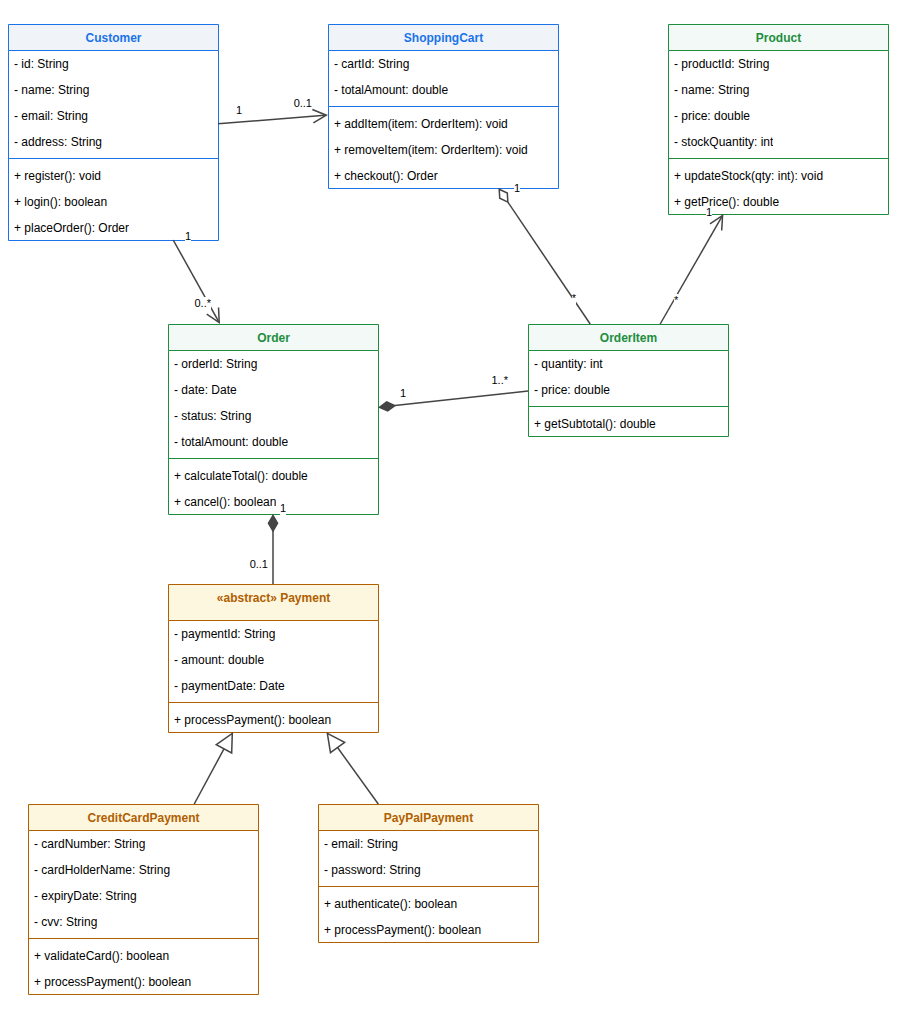
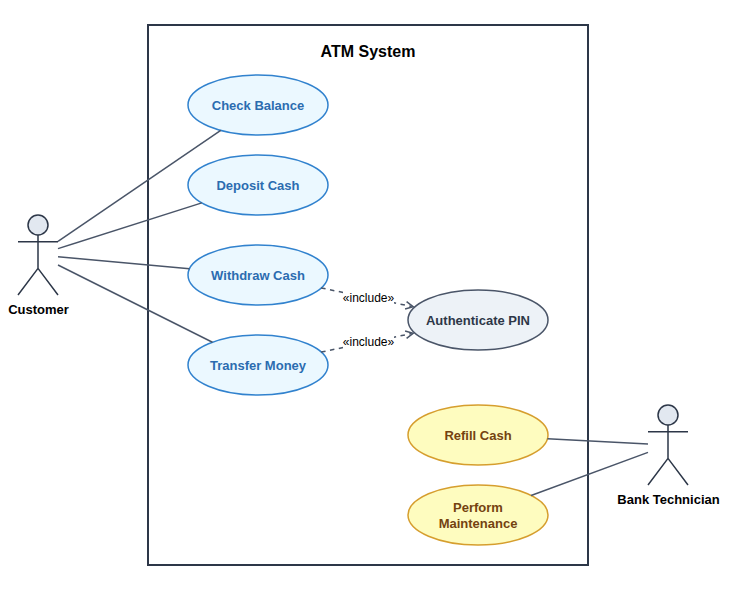
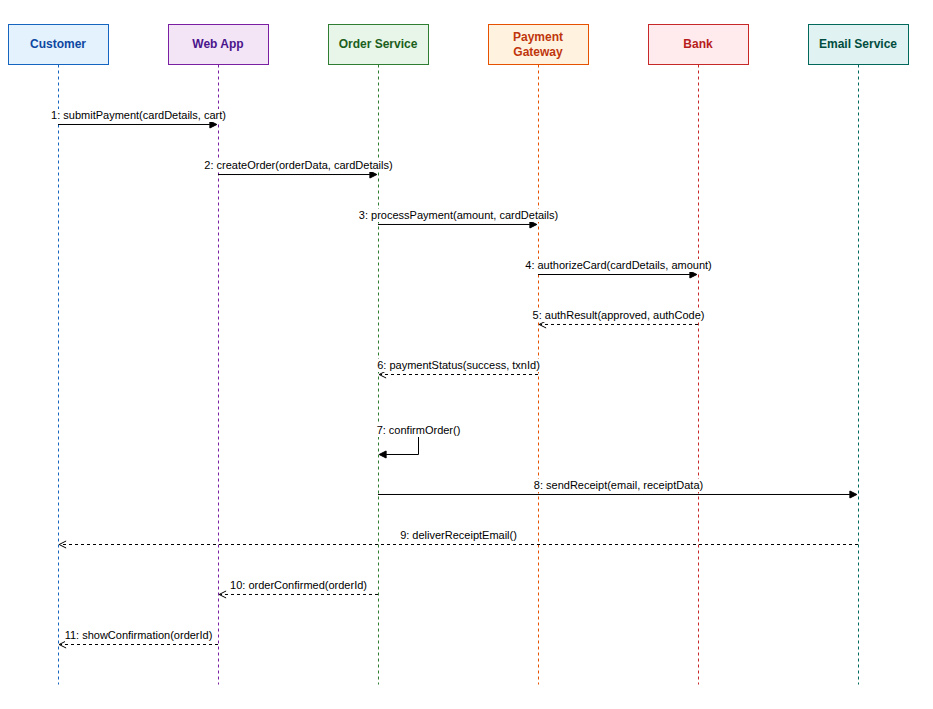
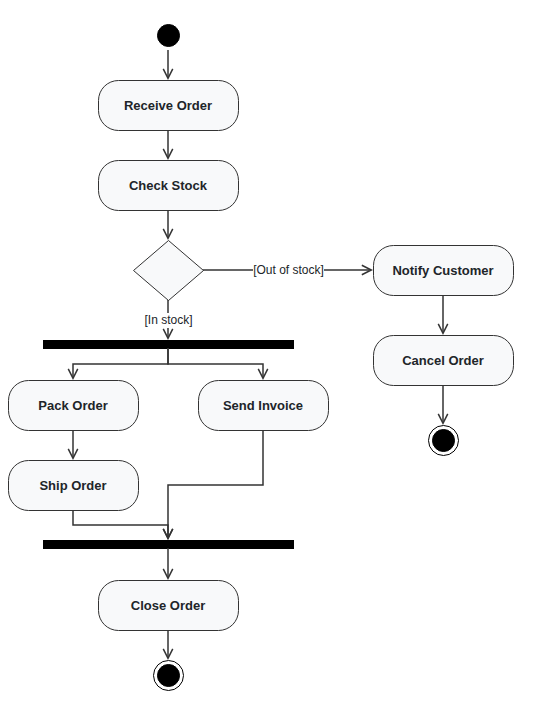
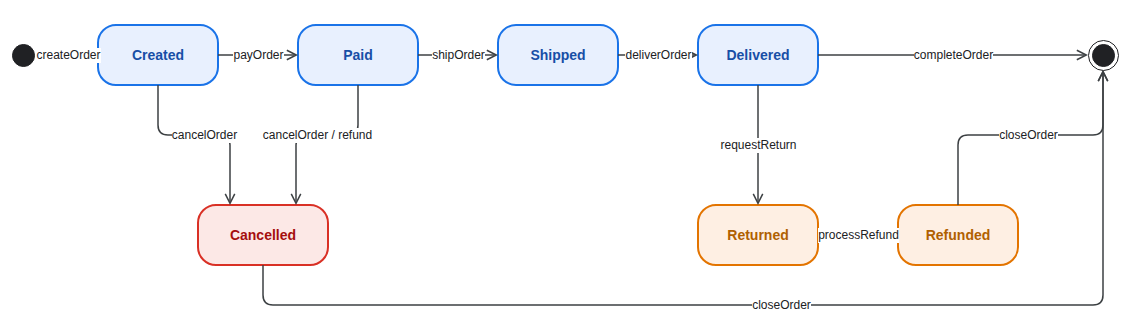
Every example came from the matching description in the examples list above. The UML diagram generator laid them out with no manual cleanup.

Three Steps

How to Generate a UML Diagram From Text

The UML diagram generator turns a description into a diagram in about a minute.

1

Pick a Type and Describe

Choose class, use case, sequence, activity or state, then describe the system or start from an example.

2

Review the Free Preview

The AI draws the diagram with the right notation and shows a watermarked preview to check.

3

Unlock and Edit

Unlock the editable Draw.io file, refine it in the online editor or with AI edits, and download it.

Guide

Choosing and Describing the Right UML Diagram

Pick the view that answers your question, then describe it in a few clear sentences.

Which UML diagram do you need?

Use a class diagram for the structure of code: which classes exist, what they hold and how they relate. Use a use case diagram for what a system offers to its users. Use a sequence diagram when the order of calls between components matters, such as a login or a payment.

Activity diagrams describe a process with decisions and parallel work, while state diagrams follow one object, such as an order, through its lifecycle. If you are unsure, the UML diagram generator can start from the same description in several types so you can compare them.

Writing a good description

Name the parts and how they interact. For classes, list the main classes and any inheritance. For use cases, list actors and what each one does. For sequences, write the calls in order, including what happens on failure. Short, concrete sentences work better than long paragraphs.

You do not need to know the notation. Write "payment can be card or PayPal" rather than "Payment is a superclass", and the UML diagram generator will draw the generalization. Add method names or message parameters only when they matter to you.

From preview to a finished diagram

Check the preview against your description before unlocking. In class diagrams, look at the arrow types; in sequence diagrams, check the order of messages; in activity diagrams, make sure every decision has a labelled outcome.

After unlocking, edit shapes directly in the Draw.io editor or describe changes to the AI, such as adding a method or a new actor. You can then export the .drawio file to PNG, SVG or PDF for a report, a slide or your project documentation.

UML diagrams and ER diagrams

A class diagram and an ER diagram can look similar, but they answer different questions. The class diagram models objects and behavior in code; the ER diagram models tables, keys and stored data. Database assignments usually ask for an ERD, while software design tasks ask for UML.

For the database view, use the ER diagram generator on this site. Many projects need both, and generating both from the same description of the system keeps names and relationships consistent between the two diagrams.

What the UML Diagram Generator Covers

One tool for the UML diagrams that courses and design reviews ask for most.

Class Diagram Generator

Classes with attributes, methods and visibility, plus inheritance, interfaces, aggregation, composition and multiplicities.

Use Case Diagram Generator

Actors, a system boundary and use cases, with include, extend and generalization drawn the standard way.

Sequence Diagram Generator

Lifelines in a row, numbered messages in time order, dashed replies, and alt or loop frames when the flow branches.

Activity Diagram Generator

Start and end nodes, actions, decisions with guards, and fork and join bars for work that runs in parallel.

State Diagram Generator

States, start and final pseudostates, and transitions labelled with events, guards and actions.

Free Preview, Then Edit

Every UML diagram generator result starts as a free watermarked preview; unlock it to edit in Draw.io or with AI edits.

FAQ

UML Diagram Generator FAQ

Answers about diagram types, pricing, editing and accuracy.

1

Is the UML diagram generator free?

Generating a watermarked preview is free, up to 3 previews a day. Unlocking the editable Draw.io file costs one credit, or a small one-time payment without an account.

2

Which UML diagram types are supported?

Class, use case, sequence, activity and state machine diagrams. Pick the type before generating; each uses its own standard notation.

3

Can I generate a class diagram from code?

Paste a short summary of your classes, fields and methods, or the class names and how they relate, and generate a class diagram from it. Very long source files work better summarized.

4

Can I edit the generated diagram?

Yes. The unlocked file opens in the Draw.io editor, and you can also ask the AI for changes, such as adding a method, an actor or a message.

5

How accurate is the AI UML generator?

It follows your description closely and adds obvious details when the description is brief. Always review the result, especially arrow types and multiplicities, before submitting it.

6

Can I write in another language?

Yes. Describe the system in your own language, and the UML diagram generator writes class, actor and message names in the language you used.

7

Does it replace a modeling tool?

It replaces the slow first draft. For long-term models, keep the .drawio file in your repository next to the code and update it as the design changes, either by hand or with AI edits.

8

What formats can I export?

You get a .drawio file, which Draw.io can export to PNG, JPG, SVG and PDF. The site's converters can also turn it into PowerPoint.

Generate Your UML Diagram Now

Pick a diagram type, describe your system, and let the UML diagram generator draw the first version for you.