Sequence Diagram Generator: Describe the Flow, Get UML

Write who talks to whom and in what order. The AI draws lifelines, numbered messages, dashed replies and alt or loop frames as a Draw.io file you can edit.

0/2000

Try an example

Free preview, no account needed. Pay $1.99 only to unlock the editable file.

Show Exactly Who Calls Whom, and When

A sequence diagram follows one scenario through time: each participant gets a lifeline and every call is an arrow in order. Getting dozens of arrows evenly spaced by hand is tedious. This sequence diagram generator lays them out for you from a plain description.

Messages in Order

Every call is numbered and placed below the previous one, so the diagram reads top to bottom like the scenario itself.

Replies and Fragments

Return messages are dashed, and branches or repeats are wrapped in alt, opt or loop frames with their conditions.

Editable in Draw.io

Lifelines and messages are real Draw.io UML shapes, so you can add a step or rename a call without redrawing.

Sequence Diagrams Made From a Few Sentences

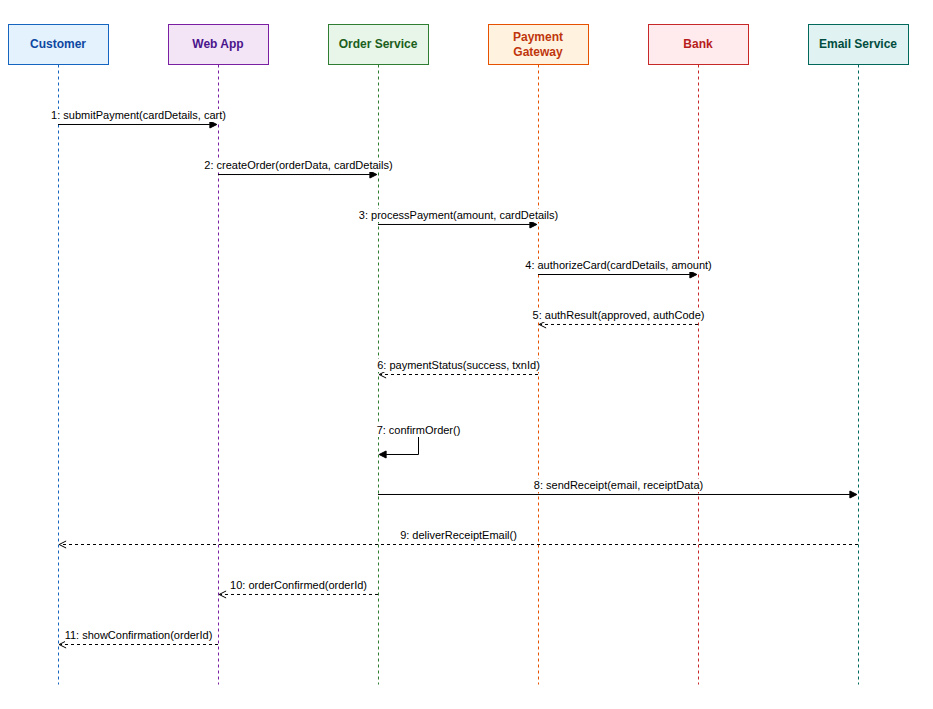
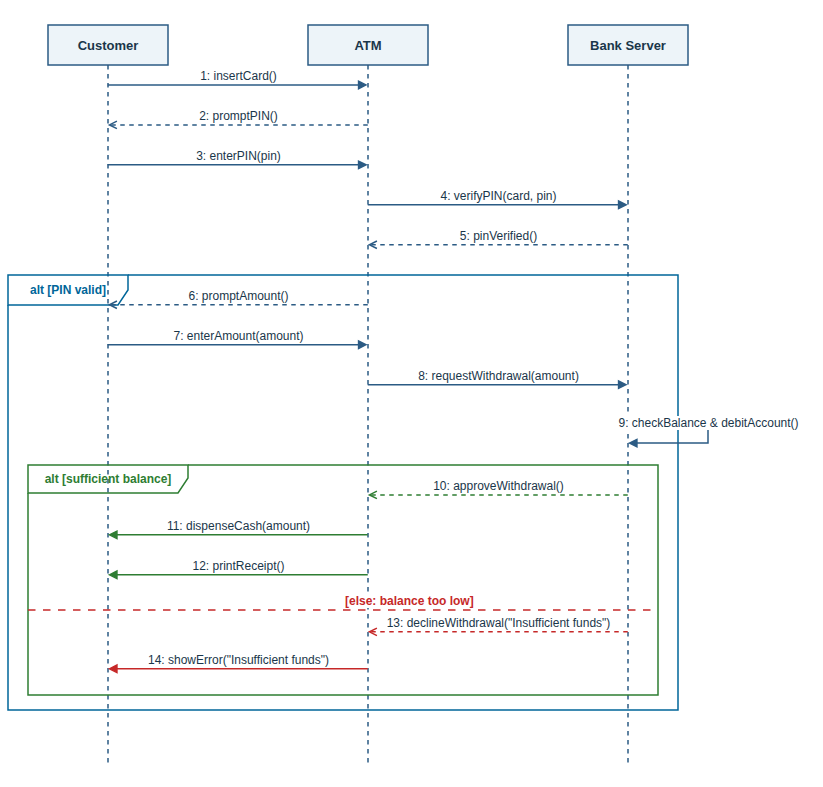
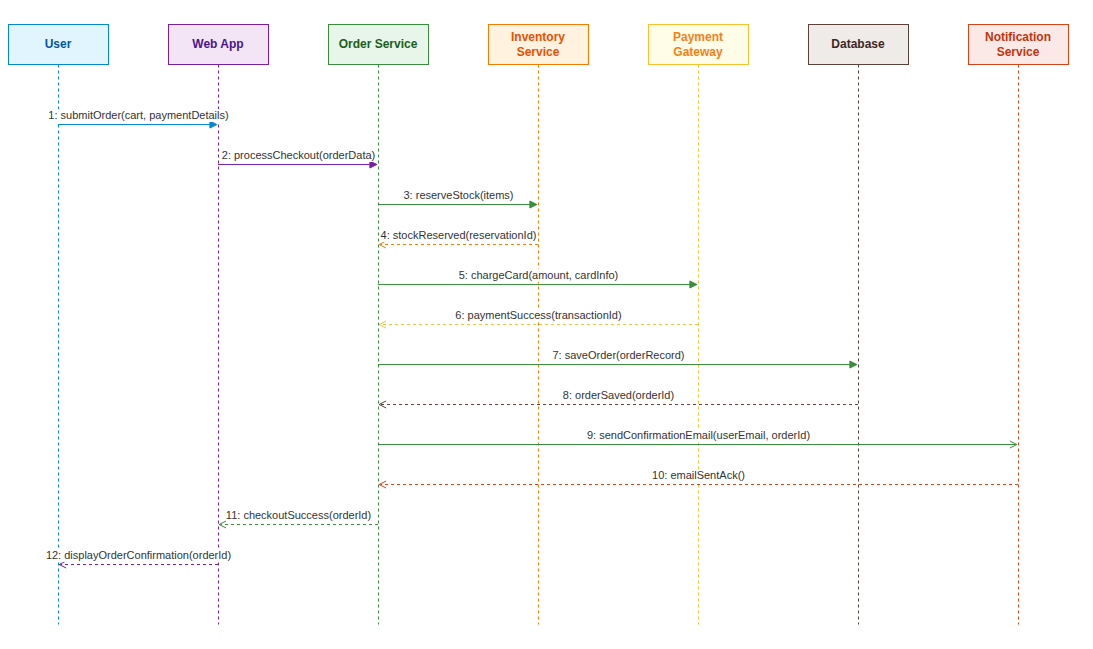
The sequence diagram generator drew each example below from one short description, with no manual layout.

Three Steps

How to Make a Sequence Diagram From Text

The sequence diagram generator turns a short description into a finished diagram in about a minute.

1

Describe the Interaction

Write the steps in order, including who calls whom, or start from one of the examples above the button.

2

Review the Free Preview

The AI draws the lifelines, messages and frames and shows a watermarked preview so you can check the flow.

3

Unlock and Edit

Unlock the editable Draw.io file, refine it in the online editor or with AI edits, and download it.

Guide

Describing an Interaction So the Diagram Comes Out Right

What a sequence diagram is for, how to write the scenario, and what to check before you use it.

What a sequence diagram shows

A UML sequence diagram shows one scenario as a conversation over time. Participants, such as a user, a browser, a service or a database, sit in a row at the top. Each has a dashed lifeline running down, and the messages between them are arrows read from top to bottom.

It is the clearest way to explain a login, a payment or an API call chain to someone who was not in the room, which is why reviews, documentation and exams ask for it. A sequence diagram generator handles the spacing so you can focus on getting the steps right.

How to write the scenario

Tell it as a short story in order: who starts, who they call, what comes back. "The browser sends the form to the server, the server asks the database, the database returns the user" is ideal. Name each participant the same way every time so it gets a single lifeline.

Say where the flow can branch or repeat. "If the password is wrong, show an error" becomes an alt frame, "for each item in the cart" becomes a loop, and "optionally apply a coupon" becomes an opt frame. Mention return values when they matter, such as a token or an order id.

Checking the result

Read the arrows from top to bottom and compare them with your story. Every request that expects an answer should have a dashed reply further down, and messages should not jump ahead of the step that triggers them. Check that each frame wraps exactly the messages its condition covers.

If a step is missing or out of order, move it in the editor or ask the AI to fix it. Keeping one diagram to one scenario, such as a successful login, keeps it readable; draw the failure case as a separate diagram or as an alt branch.

Sequence diagrams alongside other UML views

A sequence diagram zooms into a single use case. The use case diagram lists all the goals, the class diagram defines the objects that send these messages, and an activity diagram shows the overall workflow with its decisions and parallel steps.

This site has a generator for each of those views, and all of them produce Draw.io files that open in the same editor. Reusing the same names across diagrams makes a design document much easier to follow.

Why Use This Sequence Diagram Generator

Made for students, developers and architects who need to explain a flow clearly and keep the diagram up to date.

Plain Language Input

Describe the scenario as a story. The model picks out the participants, the calls between them and the order they happen in.

Synchronous and Asynchronous Calls

The sequence diagram generator gives requests that wait for an answer a filled arrowhead, and fire-and-forget messages or events an open one.

Self-Calls

When a participant does work on its own, such as validating input, the sequence diagram generator draws a message that loops back to its lifeline.

Free Preview First

Check a watermarked image of the result before you pay. Unlock the editable file only when the flow is right.

AI Edits After Unlock

Ask for changes such as "add a retry loop around the payment call", and the diagram updates in the editor.

Any Language

Write your description in English, Chinese, Indonesian, Spanish or another language, and the labels follow your language.

FAQ

Sequence Diagram Generator FAQ

Answers about notation, pricing, editing and limits.

1

Is the sequence diagram generator free?

A watermarked preview is free, up to 3 a day. The editable Draw.io file costs one credit, or a small one-time payment without an account.

2

Does it support alt, opt and loop frames?

Yes. Describe the condition or the repetition, and the sequence diagram generator wraps those messages in the matching frame with its guard.

3

Can it draw a sequence diagram from an API description?

Yes. List the endpoints in the order they are called and the services involved, and the sequence diagram generator turns each call into a numbered message.

4

Can I edit the diagram afterwards?

Yes. The unlocked file opens in the Draw.io editor, where you can change anything by hand or ask the AI for changes.

5

How many messages can one diagram hold?

Descriptions up to 2,000 characters work well, usually up to about 25 messages. Split very long flows into several diagrams.

6

Is this different from Mermaid or PlantUML?

Those tools turn code into a fixed image. Here you write plain sentences and get a Draw.io file whose shapes you can still move and edit.

7

Can I write the description in another language?

Yes. Participants and messages are labelled in the language you write in, unless you ask for English names.

8

What formats can I export?

You get a .drawio file. Draw.io exports it to PNG, JPG, SVG and PDF, and this site can also turn it into PowerPoint.

Generate Your Sequence Diagram Now

Describe the steps of your scenario and let the sequence diagram generator draw the first version for you.