Network Diagram Generator: Describe It, Get the Topology

Describe how your devices connect, or upload a picture of an existing diagram. The AI draws a clean topology with Cisco icons, as Draw.io, PNG, JPG, SVG, PDF or PowerPoint.

Diagram type

Output format

The output format can't be changed after the diagram is generated.

0/2000

Try an example

Free preview, no account needed. Pay $1.99 only to unlock the editable file.

Draw Your Network Without Dragging Icons

A network diagram shows how routers, firewalls, switches, servers and end devices connect. Drawing one by hand means hunting for icons, lining them up and routing every cable. This network diagram generator does that work from a few sentences.

Real Network Icons

Routers, switches, firewalls, access points, servers, PCs and phones use the standard Cisco icons that network engineers recognise.

Zones, VLANs and Sites

The network diagram generator turns DMZs, VLANs, server rooms, floors and branch offices into labelled zones, with subnets shown when you give them.

Editable or Ready to Use

Get an editable Draw.io diagram with AI edits, or a finished PNG, JPG, SVG, PDF or PowerPoint file, from the same description.

Network Diagrams Made From One Description Each

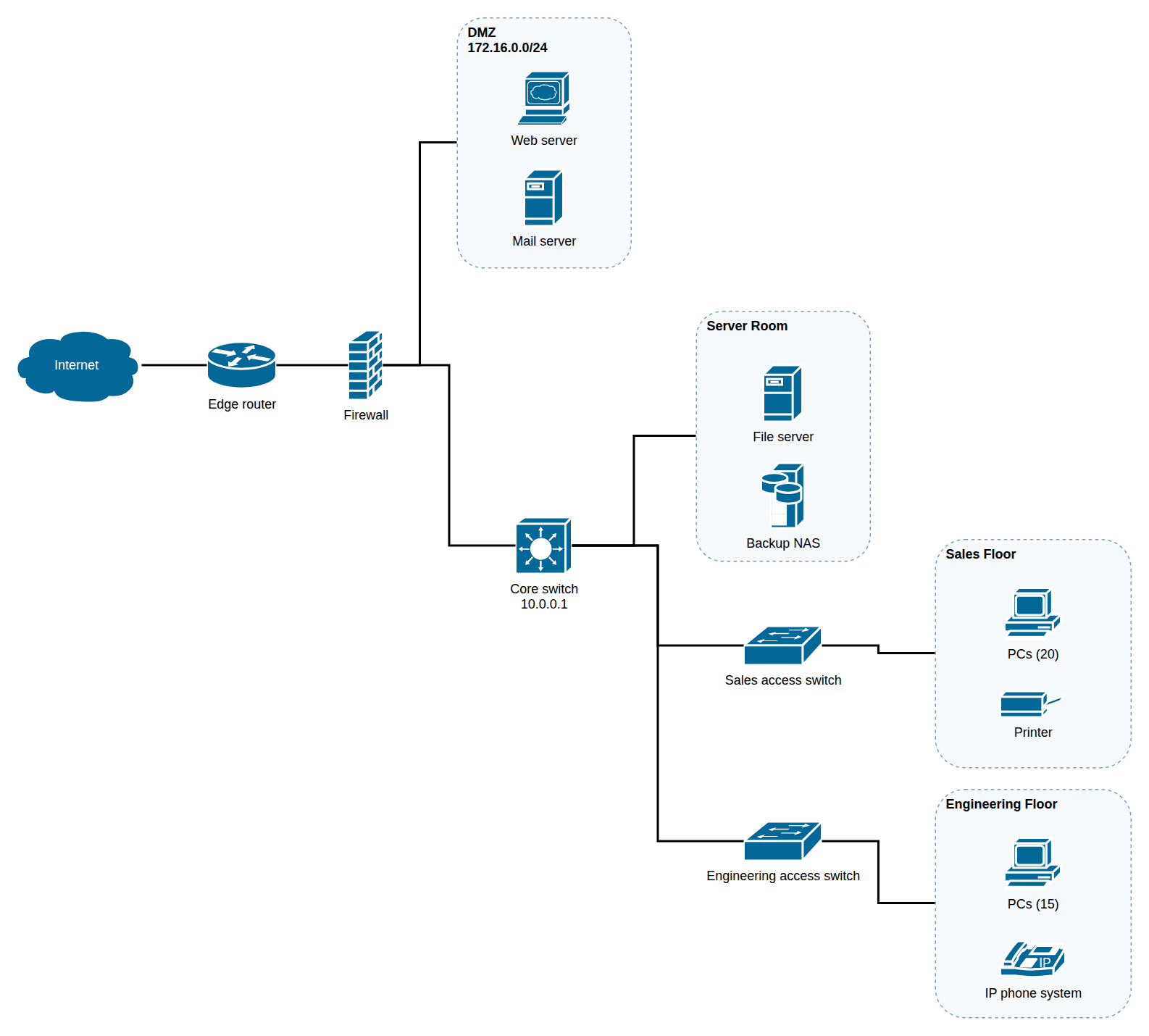
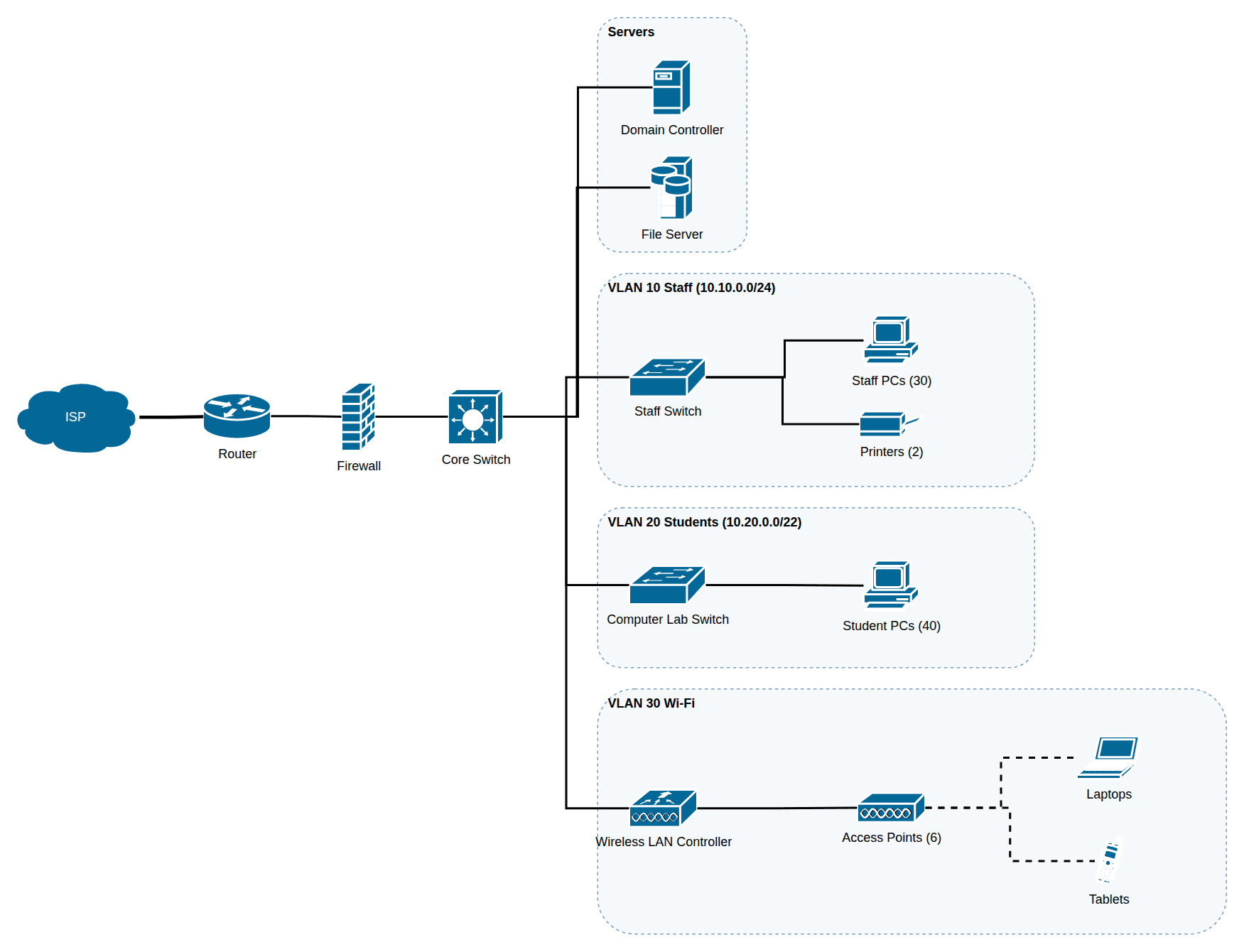
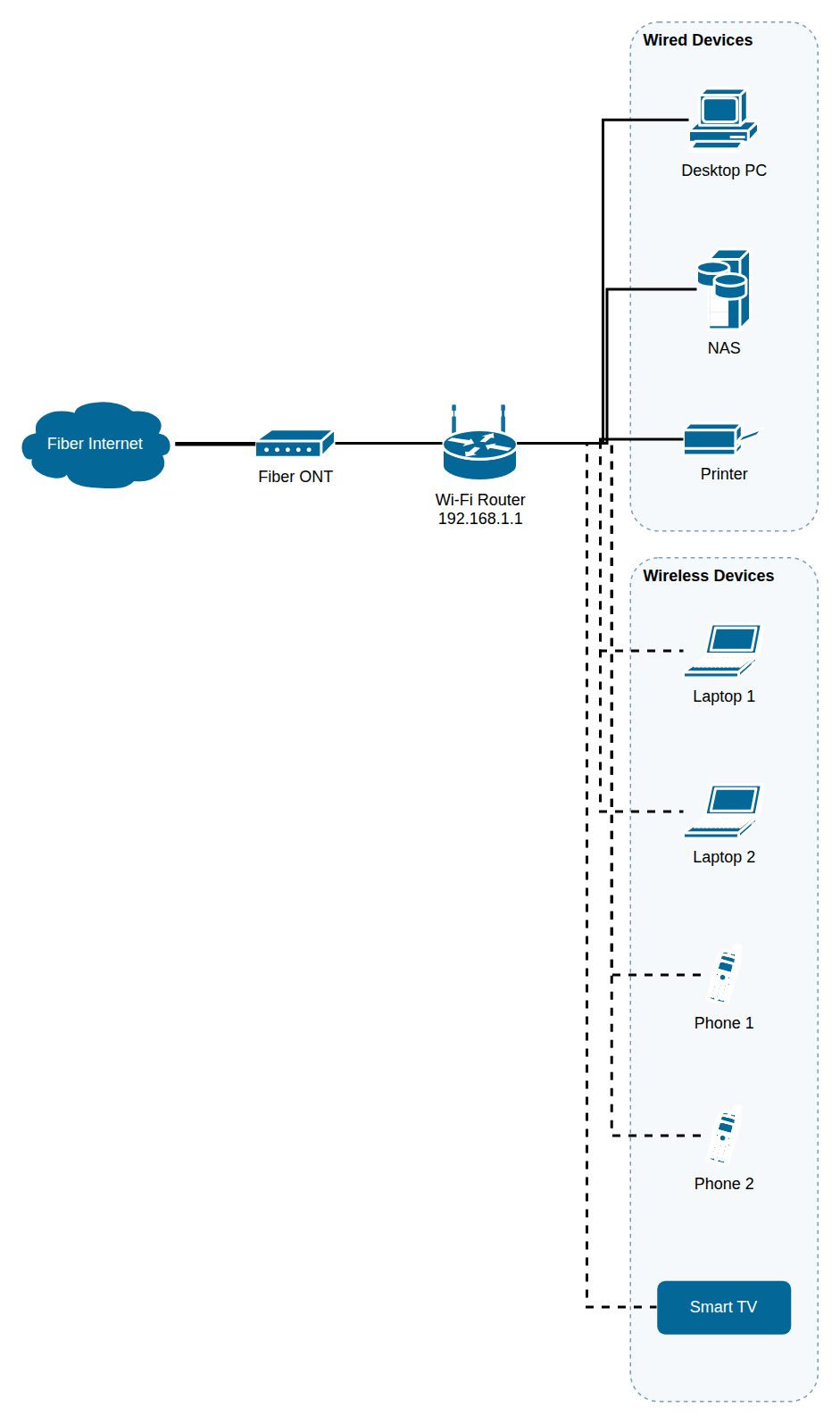
The network diagram generator drew each example below from one of the short descriptions in the examples above, with no manual layout.

Three Steps

How to Make a Network Diagram From Text

The network diagram generator turns a short description into a finished topology in under a minute.

1

Describe the Network

Pick the output format, then describe the devices and how they connect, or start from one of the examples above the button.

2

Review the Free Preview

The network diagram generator places every device with its icon, draws the links and zones, then shows a watermarked preview so you can check the topology.

3

Unlock and Edit

Unlock the file, refine it in the online editor or with AI edits, and download it.

Guide

Making Network Diagrams With AI

What a network topology diagram shows, how to describe a network so the AI draws it correctly, and where this tool fits.

What a network topology diagram shows

A network topology diagram is a map of how devices connect: where the internet comes in, which router and firewall protect the network, how switches fan out to floors or VLANs, and where servers, PCs, printers and access points sit. A physical diagram shows the devices and cables; a logical one groups them by subnet or VLAN.

IT teams keep these diagrams for troubleshooting, audits and onboarding. Students draw them for networking courses and certification labs, and consultants include them in proposals. A network diagram generator turns the description you already have in your head or in your notes into that map.

How to describe your network for the AI

Start at the edge and work inwards: internet or ISP, modem, router, firewall, core switch, then each access switch and what plugs into it. Arrows such as "router -> firewall -> switch" work well. Name the zones you want drawn, such as a DMZ, a server room, floors or VLANs, and add subnets, IP addresses or link speeds wherever you want them shown.

For many identical devices, give a count, such as "30 staff PCs", rather than listing each one. Say which links are wireless or VPN tunnels so they are drawn as dashed lines. For several sites, describe each site and how it connects to the others, for example over MPLS or site-to-site VPN.

AI compared with drawing a network by hand

In Visio, Lucidchart or the Draw.io editor you search the icon libraries, drag every device onto the canvas, align the rows and route each cable around the others. A small office network with twenty devices can take most of an hour, and moving one switch means re-routing its links.

With AI you write the description and the network diagram generator places and connects everything in under a minute. Because the result is a standard Draw.io file with the regular Cisco shapes, you can still move a device, change an icon or add notes by hand, which a tool that only exports a picture does not allow.

Network diagrams compared with architecture diagrams

A network diagram is about devices and the cables or wireless links between them: routers, switches, firewalls and the hosts behind them. A software or cloud architecture diagram is about services, APIs, databases and how requests flow between them, often with AWS or Azure icons.

If you are documenting an application or a cloud deployment rather than the physical network, use the architecture diagram generator instead. If you already have a network diagram as a picture, such as a whiteboard photo or a screenshot from an old document, upload it on the image tab and it is redrawn as an editable diagram.

Why Use This Network Diagram Generator

Made for network admins, IT students, MSPs and anyone who needs to document or plan a network quickly.

Plain Language Input

Describe the network the way you would explain it to a colleague, with arrows or full sentences. The model works out which device connects to which.

A Layout That Reads Left to Right

The network diagram generator places the internet on the left and each layer to its right: router, firewall, core, access and end devices, so traffic is easy to follow.

Wired, Wireless and VPN Links

Cables are solid lines, Wi-Fi links are dashed, and VPN tunnels are dashed in a contrasting colour, with speeds, ports or VLANs as labels when you give them.

No Invented Details

IP addresses, VLAN ids and models appear only when you give them, and 25 identical PCs become one icon with a count instead of a wall of icons.

Free Preview First

Check a watermarked image of the topology before you pay. Unlock the file only when every device and link is right.

AI Edits After Unlock

Ask for changes such as "add a second firewall for redundancy", and the diagram updates in the editor.

FAQ

Frequently Asked Questions

Answers about generating network diagrams from text.

1

Is the network diagram generator free?

A watermarked preview is free, up to 3 a day. The finished file costs one credit, or a small one-time payment without an account.

2

Which icons does it use?

The network diagram generator uses the standard Cisco icons built into Draw.io: routers, switches, layer 3 switches, firewalls, VPN gateways, access points, servers, PCs, laptops, printers, IP phones and clouds. Other devices, such as cameras or sensors, are labelled boxes.

3

Which output formats can I choose?

Draw.io, PNG, JPG, SVG, PDF or PowerPoint. Draw.io stays editable with AI edits; the others are finished files. Mermaid has no network topology syntax, so it is not offered here.

4

Can it show VLANs, subnets and IP addresses?

Yes. Name the VLANs or zones and give their subnets, and the network diagram generator draws each as a labelled zone. IP addresses you give appear under the device names; none are made up.

5

Can it draw several sites connected by VPN or MPLS?

Yes. Describe each site and how they connect, and the network diagram generator draws each site as a zone, with VPN tunnels as dashed coloured lines and WAN links as thicker lines.

6

Is this a network scanner?

No. The network diagram generator draws the network you describe and does not connect to your devices. To diagram an existing network, list what you know from your router, switch or inventory records.

7

Can I write the description in another language?

Yes. Write in English, Chinese, Indonesian, Spanish or most other languages, and the device and zone labels use the language you wrote in.

8

Can I convert a network diagram image into an editable one?

Yes. Switch to the image tab and upload a screenshot, scan or whiteboard photo of the diagram, and it is redrawn as an editable diagram.

Draw Your Network Diagram Now

Describe your devices and links, and let the network diagram generator draw the first version for you.